
ChatGPT user
AI summary
Every user in your ChatGPT Enterprise workspace is represented as a ChatGPT user object, containing 39 properties across nine groups: identity, organization, activity, compliance, and costs. The object links to related entities like conversations, projects, and automations, and supports segmentation by role, seat type, usage patterns, and compliance status. Policies flag issues such as idle accounts, password-based logins, and spend cap violations.
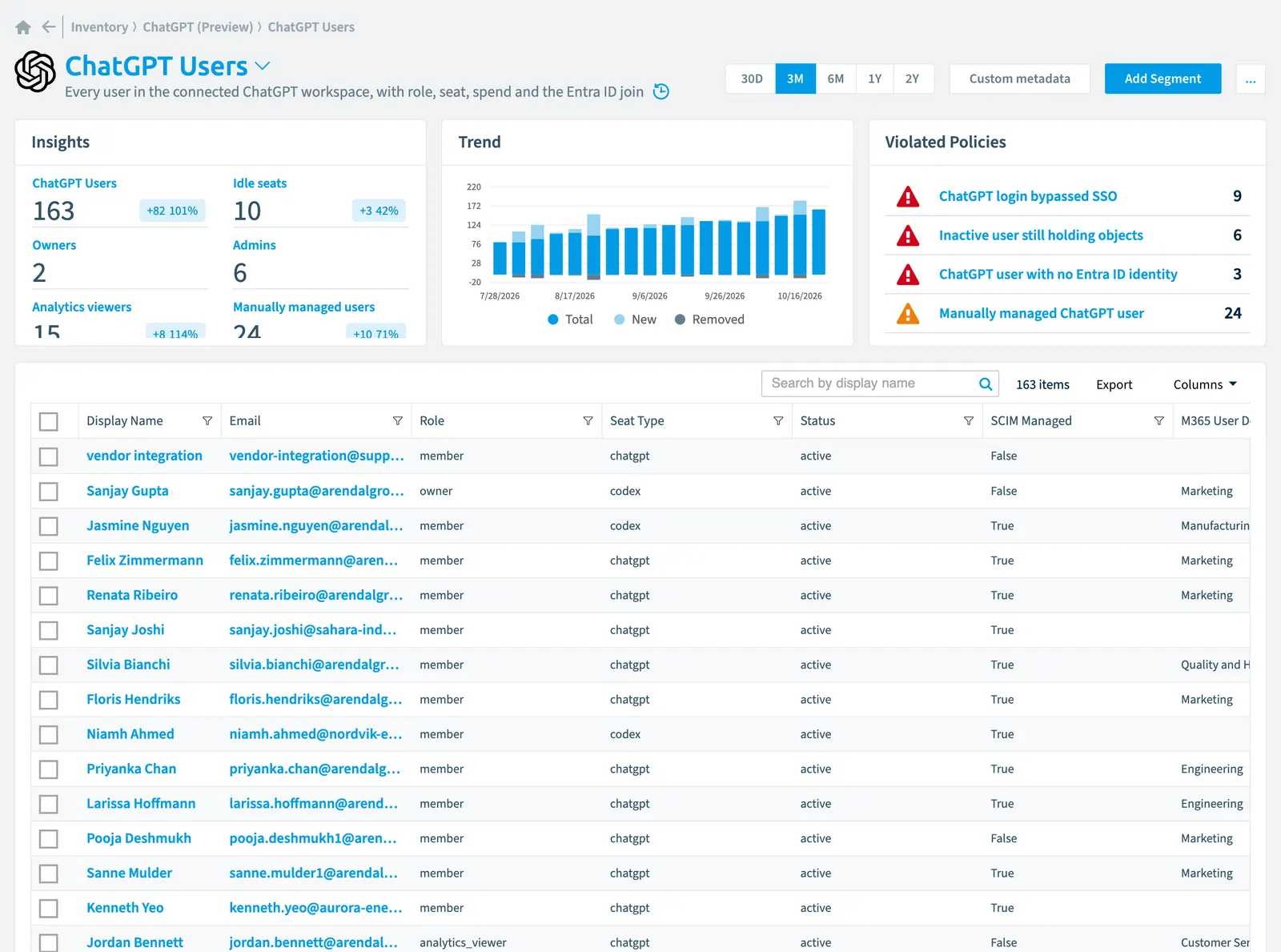
Every user in the connected ChatGPTChatGPT EnterpriseChatGPT Enterprise is the business plan of the ChatGPT AI assistant by OpenAI.Read more workspace, with role, seat, spend and the Entra IDMicrosoft Entra IDMicrosoft Entra ID, formerly Azure Active Directory, is the Microsoft identity service behind every Microsoft 365 tenant.Read more join
Part of the ChatGPT Enterprise inventory.
In Rencore Governance
Scan settings
| Default scanning interval | Allowed scanning intervals | Data removal during incremental scan |
|---|---|---|
| Daily | Daily, Weekly, Bi-Weekly, Monthly, Never, Initial | Yes |
Properties
39 properties in 9 groups. Open a group to see its properties.
Name and identity 4
| Property | Type | Description | Automation placeholder |
|---|---|---|---|
| Display Name | String | {{ChatGPTUser. | |
| String | The user's ChatGPT email address. | {{ChatGPTUser. | |
| ID | String | The ChatGPT auth user id (user-...). OpenAI's routes name people by it; the relations in this service use the email. | {{ChatGPTUser. |
| M365 User Name | String | {{ChatGPTUser. |
Organization and location 4
| Property | Type | Description | Automation placeholder |
|---|---|---|---|
| M365 User Country | String | {{ChatGPTUser. | |
| M365 User Department | String | Department of the matching Entra ID user. This is what lets ChatGPT cost and risk be read by organisational unit rather than by email address. | {{ChatGPTUser. |
| WorkspaceWorkspaceA Workspace is the top-level container in Rencore Governance. It holds the settings, users, roles and connected apps for exactly one Environment, the connected Microsoft 365 tenant.Read more | ChatGPT Workspace | The workspace this membership belongs to. | {{ChatGPTUser. |
| Workspace Name | String | {{ChatGPTUser. |
Activity and usage 6
| Property | Type | Description | Automation placeholder |
|---|---|---|---|
| Codex Lines Of Code Last 30 Days | Double | Code attribution from the CodexChatGPT CodexCodex is the OpenAI coding agent that is part of a ChatGPT Enterprise workspace.Read more analytics API. Reported per user because the Microsoft 365Microsoft 365Microsoft 365 is the Microsoft cloud suite of Teams, SharePoint, OneDrive, Exchange and the Office apps.Read more join needs per-user attribution; roll it up through reports rather than reading it per person. | {{ChatGPTUser. |
| Codex Turns Last 30 Days | Double | {{ChatGPTUser. | |
| Current Month Usage | Double | Live month-to-date usage against the cap. This is the only place a live figure is available. | {{ChatGPTUser. |
| Last scan update | DateTime | Shows when this object was last updated in a scan. If an object is found during a scan but no property has been changed this date will not change. | {{ChatGPTUser. |
| Last Month Usage | Double | {{ChatGPTUser. | |
| Status | String | Allowed values: active, inactive. | {{ChatGPTUser. |
Dates and scanning 2
| Property | Type | Description | Automation placeholder |
|---|---|---|---|
| Created At | DateTime | When the user joined the workspace, from the compliance users export. | {{ChatGPTUser. |
| Initially Scanned | DateTime | Shows when this object was initially found in a scan. | {{ChatGPTUser. |
Sharing and access 1
| Property | Type | Description | Automation placeholder |
|---|---|---|---|
| M365 User is guest | Boolean | True when the matching Entra ID user is external. | {{ChatGPTUser. |
Security and compliance 5
| Property | Type | Description | Automation placeholder |
|---|---|---|---|
| Key | String | Internal. | {{ChatGPTUser. |
| Risk Score | Int32 | Stores risk score | {{ChatGPTUser. |
| Risk Score Update | DateTime | Stores risk score update | {{ChatGPTUser. |
| Risk Score Value | String | Stores risk score value like Low_Low | {{ChatGPTUser. |
| Role | String | The workspace role. The legacy role vocabulary from the compliance export is mapped onto these modern values. Allowed values: admin, analytics_viewer, member, owner. | {{ChatGPTUser. |
Storage, licences and cost 14
| Property | Type | Description | Automation placeholder |
|---|---|---|---|
| Codex Cost Last 30 Days (USD) | Double | {{ChatGPTUser. | |
| Codex Credits Last 30 Days | Double | Codex credits consumed by this developer over the last 30 days. | {{ChatGPTUser. |
| Costs Last 30 Days (USD) | Double | {{ChatGPTUser. | |
| Costs This Month (USD) | Double | {{ChatGPTUser. | |
| Effective Limit | Double | The cap actually in force for this user. | {{ChatGPTUser. |
| Effective Limit Source | String | Where the cap comes from: the user's own override, their group default, the workspace default, or a role-based personal budget. Allowed values: group_default, individual_override, role_based_personal_budget, workspace_default. | {{ChatGPTUser. |
| Effective Limit Type | String | Whether the user has a spend cap at all. Allowed values: limited, unlimited. | {{ChatGPTUser. |
| Effective Limit Unit | String | {{ChatGPTUser. | |
| Inherited Limit | Double | The cap the user would have without an individual override. | {{ChatGPTUser. |
| Override Limit | Double | An individual override on top of the inherited cap. | {{ChatGPTUser. |
| Override Expires At | DateTime | When a temporary override lapses. Set means the elevated cap is time-boxed. | {{ChatGPTUser. |
| Seat Type | String | Which seat the user holds. A Codex seat with no Codex usage is a reclaim candidate. Allowed values: chatgpt, codex. | {{ChatGPTUser. |
| Total Credits | Double | {{ChatGPTUser. | |
| Total Cost (USD) | Double | {{ChatGPTUser. |
Settings 1
| Property | Type | Description | Automation placeholder |
|---|---|---|---|
| SCIM Managed | Boolean | True when the account is provisioned through SCIM. Manually managed accounts bypass joiner-mover-leaver, and OpenAI refuses to remove SCIM-managed members through the API. | {{ChatGPTUser. |
Other properties 2
| Property | Type | Description | Automation placeholder |
|---|---|---|---|
| M365 User | User | The matching Entra ID user, joined on the lowercased email. No match means a shadow account. | {{ChatGPTUser. |
| Utilisation | Double | Current month usage as a share of the effective cap. Derived; null when the cap is unlimited. | {{ChatGPTUser. |
Relations
| Relation | Connector | Description |
|---|---|---|
| ChatGPT activity | ChatGPT Enterprise | Ingested ChatGPT activity: who did what and when, retained beyond OpenAI's 30-day window |
| ChatGPT agent | ChatGPT Enterprise | Agents published into the ChatGPT workspace, with their skills, connectors, run history and spend |
| ChatGPT agent run | ChatGPT Enterprise | Runs of ChatGPT workspace agents, by trigger type and invoker |
| ChatGPT app link | ChatGPT Enterprise | Third-party apps and MCP servers linked to ChatGPT accounts, derived from link and unlink events |
| ChatGPT automation | ChatGPT Enterprise | Scheduled automations owned by ChatGPT users |
| ChatGPT canvas | ChatGPT Enterprise | Canvases owned by ChatGPT users, by version count and last update |
| ChatGPT Codex daily usage | ChatGPT Enterprise | Codex usage per user per day, with credits, cost, tokens and code attribution |
| ChatGPT Codex device | ChatGPT Enterprise | Phones and tablets paired to drive Codex remote control |
| ChatGPT Codex Environment | ChatGPT Enterprise | Codex sandboxes, the repositories they reach and how widely they are shared |
| ChatGPT Codex machine | ChatGPT Enterprise | Developer machines running Codex remote control |
| ChatGPT Codex task | ChatGPT Enterprise | Codex cloud tasks, by creator, source and environment |
| ChatGPT connector scope | ChatGPT Enterprise | External data sources attached to ChatGPT projects, who added them and whether they still sync |
| ChatGPT conversation | ChatGPT Enterprise | Conversations as objects: who, when, how many messages, which models, and which GPT or project - never the content |
| ChatGPT cost line | ChatGPT Enterprise | Daily ChatGPT cost lines by user, group, agent, product, surface and model |
| ChatGPT custom GPT | ChatGPT Enterprise | Custom GPTsCustom GPTA custom GPT is a version of ChatGPT that someone in your ChatGPT Enterprise workspace configured for one purpose and can share with others.Read more in the workspace, with their sharing visibility, configuration shape and usage |
| ChatGPT custom GPT | ChatGPT Enterprise | Custom GPTs in the workspace, with their sharing visibility, configuration shape and usage |
| ChatGPT custom GPT | ChatGPT Enterprise | |
| ChatGPT custom GPT | ChatGPT Enterprise | |
| ChatGPT group | ChatGPT Enterprise | The group the user belongs to. |
| ChatGPT invitation | ChatGPT Enterprise | Invitations into the ChatGPT workspace, with their role, seat type and status |
| ChatGPT library file | ChatGPT Enterprise | Files in ChatGPT user libraries, by owner, size, state and lifecycle |
| ChatGPT limit increase request | ChatGPT Enterprise | Requests for a higher ChatGPT spend cap, and how they were resolved |
| ChatGPT limit increase request | ChatGPT Enterprise | Requests for a higher ChatGPT spend cap, and how they were resolved |
| ChatGPT memory | ChatGPT Enterprise | Per-user memory footprint in ChatGPT, as counts and dates only |
| ChatGPT plugin | ChatGPT Enterprise | Plugins in the ChatGPT workspace, their discoverability and the MCP servers and skills they bundle |
| ChatGPT plugin | ChatGPT Enterprise | |
| ChatGPT project | ChatGPT Enterprise | ChatGPT projects, with their sharing visibility, tools, connector scopes and usage |
| ChatGPT project | ChatGPT Enterprise | |
| ChatGPT recording | ChatGPT Enterprise | Recordings owned by ChatGPT users, by duration and date only - transcripts are never read |
| ChatGPT service account | ChatGPT Enterprise | Non-human identities in the ChatGPT workspace, with their credentials and share targets |
| ChatGPT service account share | ChatGPT Enterprise | Principals a ChatGPT service account is shared with, and the role they hold on it |
| ChatGPT skill | ChatGPT Enterprise | Skills available to ChatGPT workspace agents, with their creator and attachments |
| ChatGPT user usage and limit | ChatGPT Enterprise | Each member's monthly spend cap, where it comes from, and live month-to-date usage |
| ChatGPT Workspace | ChatGPT Enterprise | The connected ChatGPT Enterprise workspace, its granted scopes and its coverage gaps |
| ChatGPT Workspace | ChatGPT Enterprise | The workspace the admin role is held in. |
| ChatGPT Workspace | ChatGPT Enterprise | The workspace the Analytics Viewer role is held in. |
| ChatGPT Workspace | ChatGPT Enterprise | The workspace the Member role is held in. |
| ChatGPT Workspace | ChatGPT Enterprise | The workspace the Owner role is held in. |
| User | Microsoft 365 | All users registered in your tenant (internal, external) |
Segments
| Segment | Description |
|---|---|
| Admins | Users holding the workspace admin role |
| Analytics viewers | Users who can read workspace-wide usage figures without holding admin rights |
| Codex seat without Codex usage | Users on a Codex seat with no Codex usage in the last 30 days |
| Codex seats | Users holding a Codex seat |
| External users | ChatGPT users whose Entra ID identity is a guest |
| Idle seats | Users with no usage this month or last month - reclaim candidates |
| Inactive users still holding objects | Inactive users who still own GPTs, projects, agents, Codex environments or library files |
| Users with an individual override | Users whose cap comes from a personal override rather than their group or the workspace default |
| Manually managed users | Users not provisioned through SCIM, so joiner-mover-leaver does not reach them |
| Non-SSO logins | Users who signed in with a password rather than through SSO in the last 30 days |
| Owners | Users holding the workspace ownerWorkspace ownerA workspace owner is an owner of a Microsoft 365 workspace, such as a Team, a SharePoint site or a group.Read more role - the only people who can grant the owner-only compliance scopes |
| Shadow accounts | ChatGPT users with no matching Entra ID identity - accounts outside the directory entirely. Needs the Microsoft 365 Users inventory; without it every user is listed. |
| Temporary override active | Users on a time-boxed cap increase that has not yet lapsed |
| Unlimited users | Users with no spend cap in force |
| Users over 80% of their cap | Users whose month-to-date usage has passed 80% of their effective spend cap |
Actions
- Remove Workspace User
Policies that check this object
| Policy | Severity | Description |
|---|---|---|
| Codex seat with no Codex usage | Low | Detects users on a Codex seat who have not used Codex in 30 days |
| Idle ChatGPT seat | Low | Detects users with no usage this month or last month |
| Inactive user still holding objects | High | Detects inactive workspace users who still own GPTs, projects, agents, Codex environments or library files |
| Manually managed ChatGPT user | Medium | Detects workspace users who are not provisioned through SCIM |
| ChatGPT login bypassed SSO | High | Detects users who signed in with a password rather than through the identity provider in the last 30 days |
| ChatGPT user with no Entra ID identity | High | Detects ChatGPT users who do not match any Entra ID user by email |
| ChatGPT user with no spend cap | Medium | Detects users whose effective spend limit is unlimited |
| ChatGPT user over 80% of their spend cap | Medium | Detects users whose month-to-date usage has passed 80% of their effective cap |
Frequently asked questions
What is the ChatGPT user object in Rencore Governance?
What is the ChatGPT user object in Rencore Governance?Every user in the connected ChatGPT workspace, with role, seat, spend and the Entra ID join. ChatGPT user is an object type in the ChatGPT Enterprise inventory of Rencore Governance.
Which properties does Rencore Governance collect for ChatGPT user?
Which properties does Rencore Governance collect for ChatGPT user?Rencore Governance collects 39 properties for ChatGPT user, such as Key, Codex Cost Last 30 Days (USD), Codex Credits Last 30 Days and 36 more.
Which policies check ChatGPT user objects?
Which policies check ChatGPT user objects?8 built-in policies check ChatGPT user objects, such as Codex seat with no Codex usage, Idle ChatGPT seat and 6 more.
How often is ChatGPT user scanned?
How often is ChatGPT user scanned?By default daily. You can change the scan interval of ChatGPT user objects under Configure objects (daily, weekly, bi-weekly, monthly, never or initial (collected once)). The interval is a target, not a guarantee: a scan can run later than planned.
Which actions can I run on ChatGPT user objects?
Which actions can I run on ChatGPT user objects?The built-in actions for ChatGPT user objects are Remove Workspace User.
Was this page helpful?
Thanks for the feedback.
Thanks. What was wrong?