
Usage
AI summary
The Usage object in Rencore Governance captures Teams usage data from the last 180 days across 25 properties organized into eight groups. These properties measure channel and user activity, messages, meetings, external users, and risk, with scanning intervals configurable from daily to monthly.
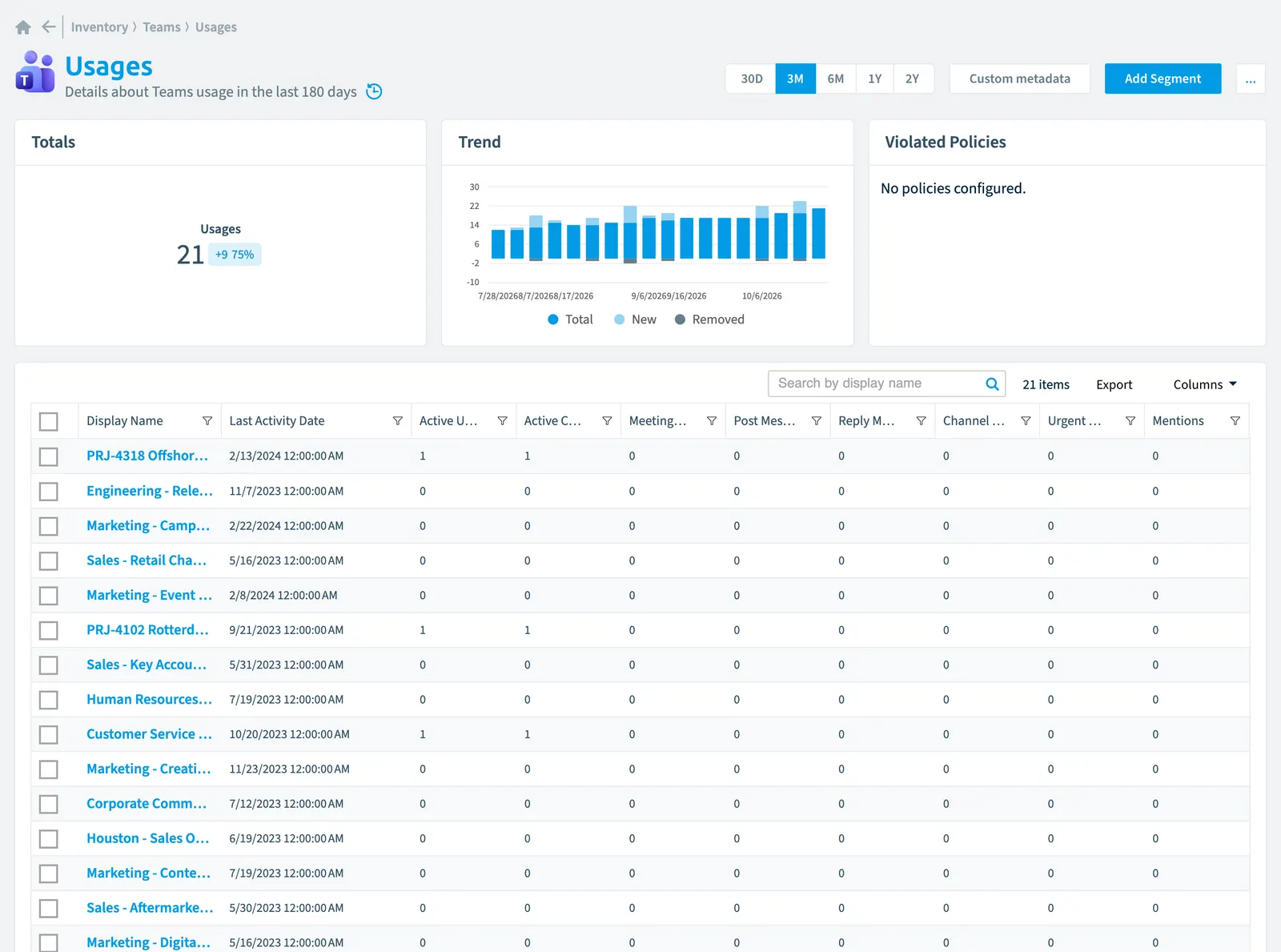
Details about TeamsMicrosoft TeamsMicrosoft Teams is the Microsoft 365 app for chat, meetings and team collaboration.Read more usage in the last 180 days
Part of the Teams inventory.
In Rencore Governance
Scan settings
| Default scanning interval | Allowed scanning intervals | Data removal during incremental scan |
|---|---|---|
| Default | Daily, Weekly, Bi-Weekly, Monthly, Never, Initial | Yes |
Properties
25 properties in 8 groups. Open a group to see its properties.
Name and identity 3
| Property | Type | Description | Automation placeholder |
|---|---|---|---|
| Display Name | String | {{Usage. | |
| Team Id | String | Id of the Team | {{Usage. |
| Team type | String | Type of the team | {{Usage. |
Organization and location 1
| Property | Type | Description | Automation placeholder |
|---|---|---|---|
| Team Name | String | Name of the Team | {{Usage. |
Activity and usage 9
| Property | Type | Description | Automation placeholder |
|---|---|---|---|
| Active ChannelsChannelA channel is a section inside a Microsoft Teams team where members hold conversations and share files on one topic.Read more | Int32 | Number of most active channels in the team in report period. | {{Usage. |
| Active Users | Int32 | Number of most active users in the team in report period. | {{Usage. |
| Channel Messages | Int32 | Number of channel messages posted in the team in report period. | {{Usage. |
| Last Activity Date | DateTime | Date of last activity in the team (e.g. Last message posted) | {{Usage. |
| Last scan update | DateTime | Shows when this object was last updated in a scan. If an object is found during a scan but no property has been changed this date will not change. | {{Usage. |
| Meetings Organized | Int32 | Number of meetings organized in the team in report period. | {{Usage. |
| Post Messages | Int32 | Number of messages posted in the team in report period. | {{Usage. |
| Reply Messages | Int32 | Number of reply messages posted in the team in report period. | {{Usage. |
| Urgent Messages | Int32 | Number of urgent messages posted in the team in report period. | {{Usage. |
AI and agents 1
| Property | Type | Description | Automation placeholder |
|---|---|---|---|
| Reactions | Int32 | Number of reactions in the team in report period. | {{Usage. |
Dates and scanning 3
| Property | Type | Description | Automation placeholder |
|---|---|---|---|
| Initially Scanned | DateTime | Shows when this object was initially found in a scan. | {{Usage. |
| Report Period | Int32 | Specifies the length of time in days over which the report data is aggregated. | {{Usage. |
| Report Refresh Date | DateTime | Date when the report data last been refreshed by Microsoft | {{Usage. |
Sharing and access 3
| Property | Type | Description | Automation placeholder |
|---|---|---|---|
| Active External UsersExternal userAn external user is an account whose home tenant belongs to another organization, invited into your tenant to work with you.Read more | Int32 | Number of active external users in report period. | {{Usage. |
| Active Shared Channels | Int32 | Number of active shared channels in report period. | {{Usage. |
| Guests | Int32 | Number of guest users in the team in report period. | {{Usage. |
Security and compliance 3
| Property | Type | Description | Automation placeholder |
|---|---|---|---|
| Risk Score | Int32 | Stores risk score | {{Usage. |
| Risk Score Update | DateTime | Stores risk score update | {{Usage. |
| Risk Score Value | String | Stores risk score value like Low_Low | {{Usage. |
Other properties 2
| Property | Type | Description | Automation placeholder |
|---|---|---|---|
| Mentions | Int32 | Number of mentions in the team in report period. | {{Usage. |
| Team | String | {{Usage. |
Relations
| Relation | Connector | Description |
|---|---|---|
| Team | Teams |
Segments
This object does currently not have any segments.
Actions
This object does currently not have any actions.
Frequently asked questions
What is the usage object in Rencore Governance?
Details about Teams usage in the last 180 days. Usage is an object type in the Teams inventory of Rencore Governance.
Which properties does Rencore Governance collect for usage?
Rencore Governance collects 25 properties for Usage, such as Active Channels, Active External Users, Active Shared Channels and 22 more.
How often is usage scanned?
You can change the scan interval of Usage objects under Configure objects (daily, weekly, bi-weekly, monthly, never or initial (collected once)). The interval is a target, not a guarantee: a scan can run later than planned.
Which module includes the Teams connector?
Which module includes the Teams connector?The Teams connector is part of the Digital Workplace module of Rencore Governance, which every Plan includes. The connector is generally available.
Was this page helpful?
Thanks for the feedback.
Thanks. What was wrong?