
App
AI summary
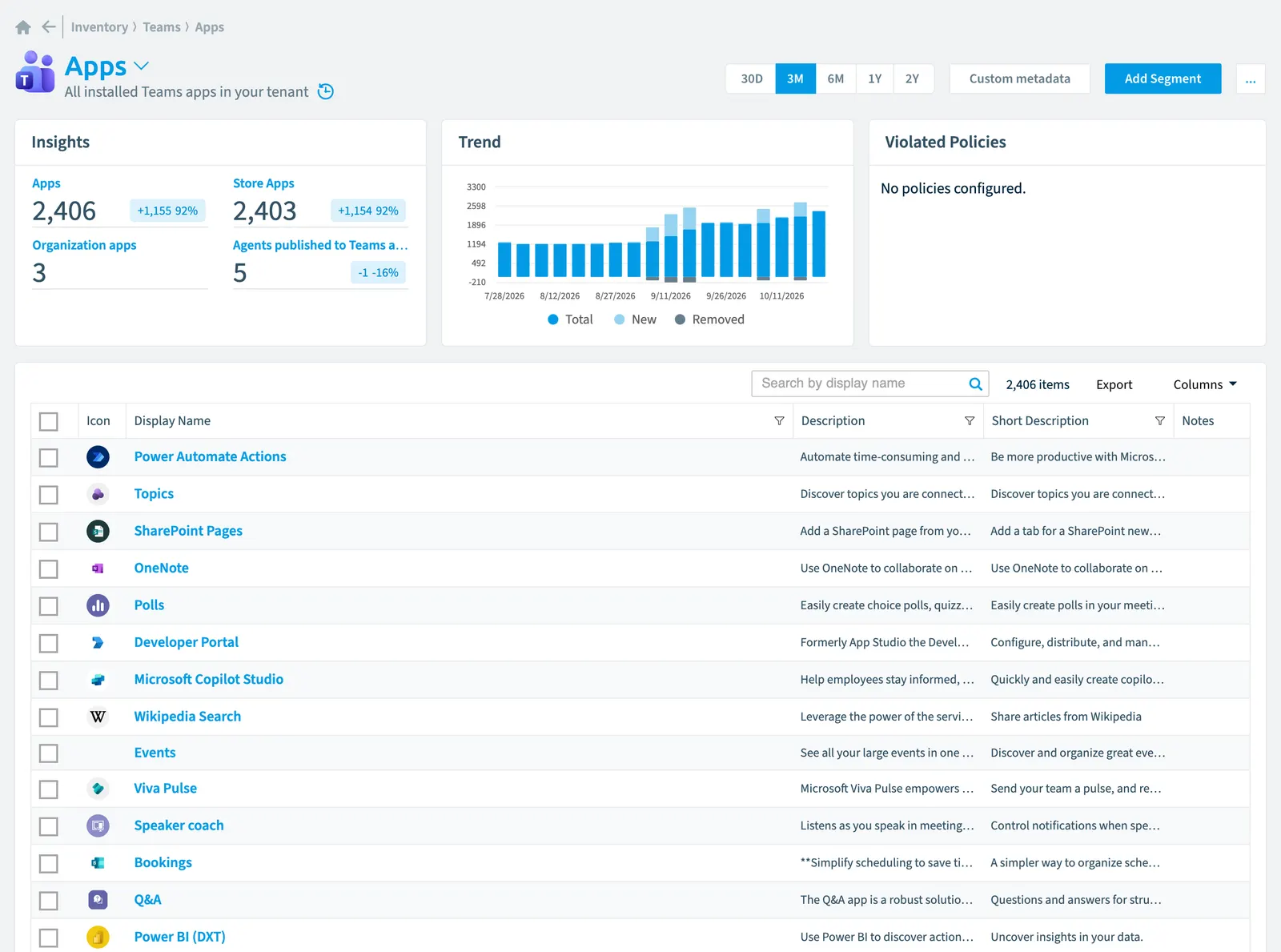
Rencore Governance creates an inventory of all Teams apps in your tenant with configurable scanning intervals. For each app, the system records properties such as distribution method (store or organization-only), version, publishing state, and risk scores. Apps are segmented by type and linked to the teams and channels using them.
All installed Teams apps in your tenant
Part of the Teams inventory.
In Rencore Governance
Scan settings
| Default scanning interval | Allowed scanning intervals | Data removal during incremental scan |
|---|---|---|
| Monthly | Daily, Weekly, Bi-Weekly, Monthly, Never, Initial | Yes |
Properties
| Property | Type | Description | Automation placeholder |
|---|---|---|---|
| Bot Id | String | If app is a bot field contains its id | {{App. |
| Initially Scanned | DateTime | Shows when this object was initially found in a scan. | {{App. |
| Description | String | An optional description for the app | {{App. |
| Icon | String | Default scanning intervalScan intervalA scan interval is how often Rencore Governance aims to scan one object type, such as daily or weekly.Read more: Initial. | {{App. |
| Display Name | String | {{App. | |
| Distribution Method | String | The method of distribution for the app. Possible values are: store = The app is available to all tenants through the Microsoft TeamsMicrosoft TeamsMicrosoft Teams is the Microsoft 365 app for chat, meetings and team collaboration.Read more app store. organization = The app is available only in this tenant. | {{App. |
| External Id | String | External id. | {{App. |
| Last scan update | DateTime | Shows when this object was last updated in a scan. If an object is found during a scan but no property has been changed this date will not change. | {{App. |
| Publishing State | String | The published status of a specific version of a Teams app | {{App. |
| Risk Score | Int32 | Stores risk score | {{App. |
| Risk Score Update | DateTime | Stores risk score update | {{App. |
| Risk Score Value | String | Stores risk score value like Low_Low | {{App. |
| Short Description | String | An optional short description for the app | {{App. |
| Teams AppId | String | The ID from the Teams app manifestTeams app manifestA Teams app manifest is the file in a Teams app package that describes the app, its icons and its permissions.Read more | {{App. |
| Version | String | The version number of the application. | {{App. |
Relations
| Relation | Connector | Description |
|---|---|---|
| Pre-defined Teams channels | Teams | Predefined Teams channelsChannelA channel is a section inside a Microsoft Teams team where members hold conversations and share files on one topic.Read more that can automatically get deployed in team during provisioning (including custom tabs). |
| Team | Teams | Teams using the app |
| Tab | Teams | All tabs of your teams in your tenant |
Segments
| Segment | Description |
|---|---|
| Agents published to Teams app catalog | Shows all Copilot agentsCopilot Studio agentA Copilot Studio agent is an AI agent someone built in Microsoft Copilot Studio.Read more and SharePoint agents which are |
| Organization apps | Shows the (custom developed) apps available only in this tenant |
| Store apps | Shows the apps available to all tenants through the Microsoft Teams app store |
Actions
This object does currently not have any actions.
Frequently asked questions
What is the app object in Rencore Governance?
All installed Teams apps in your tenant. App is an object type in the Teams inventory of Rencore Governance.
Which properties does Rencore Governance collect for app?
Rencore Governance collects 15 properties for App, such as Bot Id, Initially Scanned, Description and 12 more.
How often is app scanned?
By default monthly. You can change the scan interval of App objects under Configure objects (daily, weekly, bi-weekly, monthly, never or initial (collected once)). The interval is a target, not a guarantee: a scan can run later than planned.
Which module includes the Teams connector?
Which module includes the Teams connector?The Teams connector is part of the Digital Workplace module of Rencore Governance, which every Plan includes. The connector is generally available.
Was this page helpful?
Thanks for the feedback.
Thanks. What was wrong?