
Licenses assigned to disabled user accounts

AI summary
View which Microsoft 365 subscriptions are assigned to disabled user accounts so you can identify licenses to reallocate to active users.
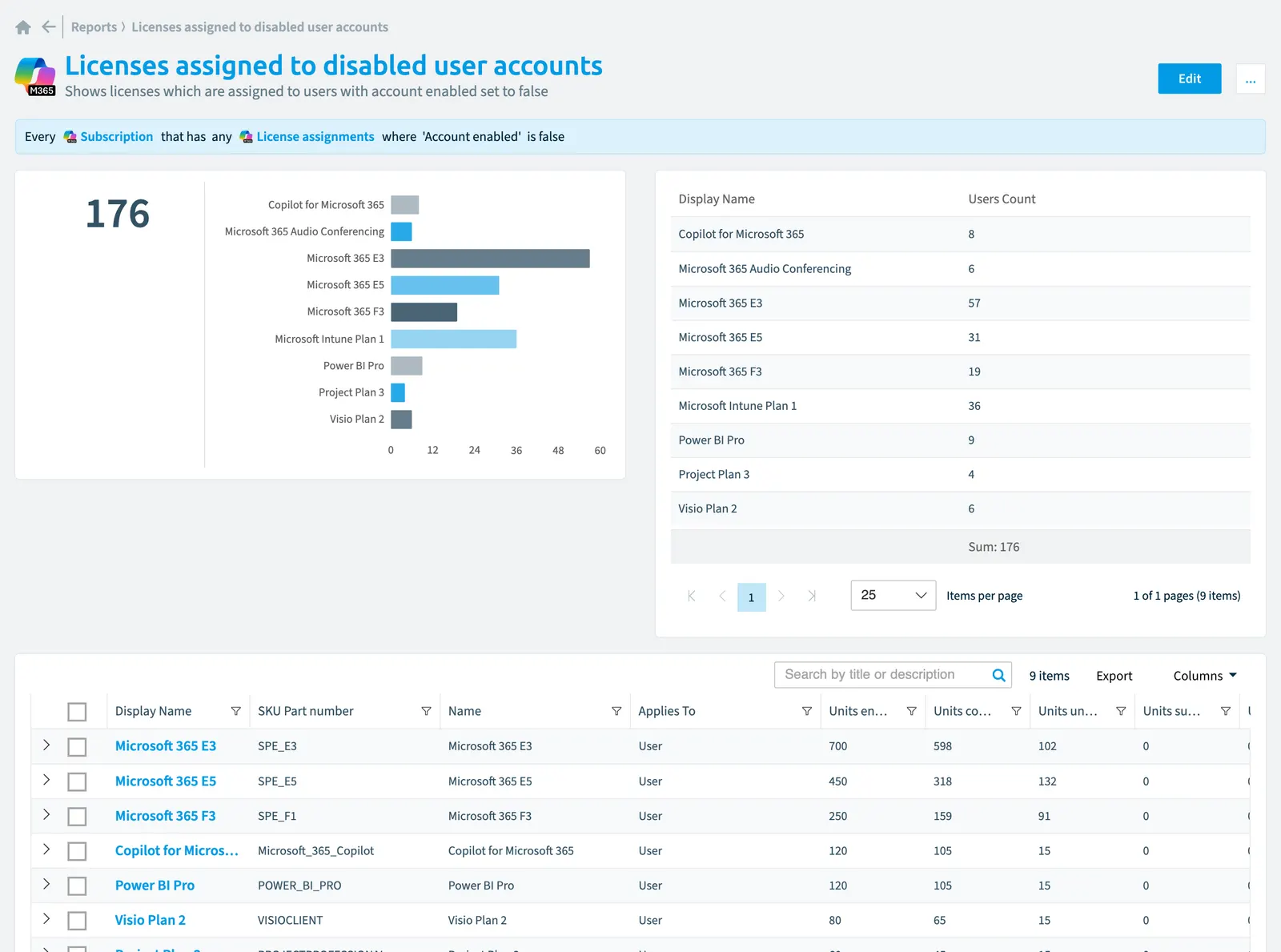
Shows licenses which are assigned to users with account enabled set to false.
What it shows
The report shows Subscription objects from the Microsoft 365Microsoft 365Microsoft 365 is the Microsoft cloud suite of Teams, SharePoint, OneDrive, Exchange and the Office apps.Read more inventory.
The rule
Every Subscription that has any License assignments where Account enabled is false
Chart
| Chart type | Bar chart |
|---|---|
| Grouped by | Display Name |
| Measure | Number of Subscription objects |
| Sorted by | Display Name, ascending |
| Limit | Top 10 |
In Rencore Governance
Details
| Reports on | Subscription |
|---|---|
| Connector | Microsoft 365 |
| Category | Costs |
| Chart type | Bar chart |
| Recommended | Yes |
| Status | Generally available |
Other reports for this object
- Unassigned Copilot license pool (CopilotMicrosoft 365 CopilotMicrosoft 365 Copilot is the AI assistant in the Microsoft 365 apps. Rencore Governance covers it with the Copilot connector, part of the AI & Agents module.Read more)
- Licenses with unused seats
- License usage for Visio, Project and Power BI Pro
- Licenses assigned to external users
- Licenses assigned to inactive users
- Suspended/disabled subscriptions
Frequently asked questions
What does the licenses assigned to disabled user accounts report show?
The Licenses assigned to disabled user accounts report: shows licenses which are assigned to users with account enabled set to false.
What is the rule of the licenses assigned to disabled user accounts report?
Every Subscription that has any License assignments where Account enabled is false.
Which objects does the licenses assigned to disabled user accounts report use?
The Licenses assigned to disabled user accounts report works on Subscription objects from the Microsoft 365 inventory and shows them as a bar chart.
Which module includes the licenses assigned to disabled user accounts report?
The Licenses assigned to disabled user accounts report comes with the Microsoft 365 connector in the Digital Workplace module of Rencore Governance, which every Plan includes.
Was this page helpful?
Thanks for the feedback.
Thanks. What was wrong?